
![[PHOTO] gaming clips - Gamer playing on PC with illuminated keyboard. Style: Action shot. Color: neon.](https://image.aiai.com/20260325/f2fb4f956c102f538883dca585aeda50.png?x-oss-process=image/auto-orient,1/resize,m_lfit,w_400/quality,q_80/format,webp)
Gaming Clips
Share your epic plays and clutch moments without Discord blocking your upload. Keep the frame rate high and the file size low.
Got the 'Your files are too powerful' error? Reduce video size instantly to fit Discord's 25MB limit. Perfect for sharing gaming clips, memes, and tutorials without paying for Nitro.
![[PHOTO] hero background - Gaming setup with dual monitors showing chat application. Style: Modern, moody lighting. Color: vibrant purple and dark. Good for text overlay.](https://image.aiai.com/20260325/ec384464df6dc9a283149c5d0bcf715c.png?x-oss-process=image/auto-orient,1/resize,m_lfit,w_1200/quality,q_80/format,webp)
Share your epic plays and clutch moments without Discord blocking your upload. Keep the frame rate high and the file size low.
![[PHOTO] memes - Person laughing at smartphone screen. Style: Casual, candid. Color: warm.](https://image.aiai.com/20260325/465a756f54429ea0010b932be96c16e2.png?x-oss-process=image/auto-orient,1/resize,m_lfit,w_400/quality,q_80/format,webp)
Keep the group chat alive by quickly shrinking funny videos and memes to fit the free 25MB limit.
![[PHOTO] tutorials - Screen recording and video editing timeline. Style: Professional. Color: cool.](https://image.aiai.com/20260325/3c18cf2ab78945df140dcccf50409616.png?x-oss-process=image/auto-orient,1/resize,m_lfit,w_400/quality,q_80/format,webp)
Help your server members by sharing screen recordings and how-to guides instantly without complicated software.
Bypass the Discord 25MB limit in three simple steps without downloading any software.
Drag and drop your oversized gaming clip or meme into our secure online uploader.
Our AI automatically adjusts the bitrate and resolution to ensure the final file is strictly under Discord's free 25MB limit.
Download your compressed MP4 video and drop it directly into your Discord server or DM.
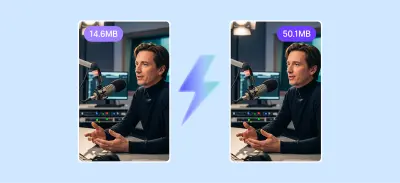
No more waiting. Compress videos in seconds directly in your browser without heavy software.
You can compress video files with just one click without downloading any software or installation packages, making it more secure.

We don't ruin your memes. Export clean, professional videos with absolutely no watermarks.
![[PHOTO] discord limits - Chat application logo on smartphone screen. Style: Editorial, macro. Color: purple.](https://image.aiai.com/20260325/0078c930a1c31ade07d8d990f0de8830.png?x-oss-process=image/auto-orient,1/resize,m_lfit,w_800/quality,q_80/format,webp)
Discord restricts file uploads based on your account tier. Free users are capped at 25MB (recently upgraded from 8MB!). Nitro Basic users get 50MB, and full Nitro subscribers can upload up to 500MB. Our tool automatically targets the 25MB limit so everyone in your server can view your content without needing premium upgrades.
![[PHOTO] video formats - Video editing timeline on monitor. Style: Close up, tech. Color: vibrant.](https://image.aiai.com/20260325/9ade357b362aed03ab3448f6b6f41f4f.png?x-oss-process=image/auto-orient,1/resize,m_lfit,w_800/quality,q_80/format,webp)
Discord loves MP4. While you can upload MOV, MKV, or WEBM files, they often cause playback issues or force users to download the file instead of watching it in-app. Our compressor not only reduces video size but automatically converts your clips to Discord-friendly MP4 format for seamless auto-play in any channel.
Everything you need to know about compressing videos for Discord.
See why thousands rely on our tool to bypass Discord size limits.
I love how it gives you an estimated file size before you even start compressing. Very transparent and reliable.
I use the video compressor daily to send large clips to my team. It's fast and the quality stays perfect.
Select the perfect plan for your needs.
No credit card required